
How to Check GDRFA Approval Status in the UAE

Last updated on January 24th, 2026
Table of Contents
The General Directorate of Residency and Foreigners Affairs (GDRFA) in Dubai handles visa approvals, entry permits, and residence applications for the emirate of Dubai. If you have applied for a UAE entry permit, visa extension, or residence visa through GDRFA, it is essential to track your application status to ensure the process goes smoothly.
This guide will provide a step-by-step process to check your GDRFA approval status online, alternative methods to inquire, and common reasons for delays.
How to Check GDRFA Approval Status Online
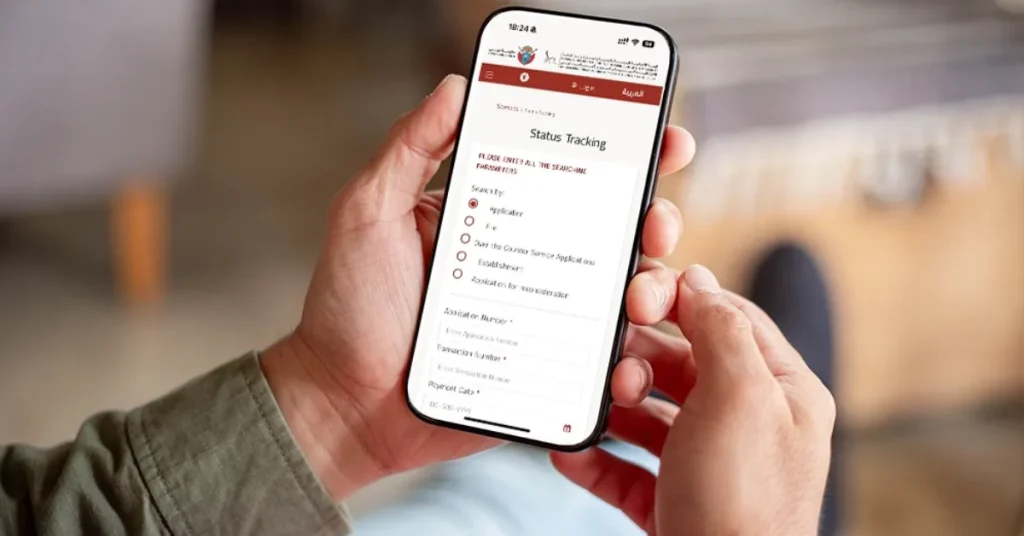
If you submitted a visa or entry permit application via GDRFA, follow these steps to check its status online.
Step 1: Visit the GDRFA Online Portal
Go to the official GDRFA website.
For status inquiries, you may use the direct “Status Inquiry” service page.
Step 2: Enter Your Application Details
On the portal, you will typically need:
- The application number or reference number.
- Your passport number and/or nationality as required.
- In some cases, the transaction/payment date or file number.
Complete any captcha or verification step and click “Search” or equivalent.
Step 3: Check the Status
After submitting, the portal will display your application status. It may show:
- Approved – your visa or permit is approved.
- Under Process or In Process – still being reviewed.
- Rejected – reasons may be displayed, or you may need to follow up for details.
If approved, further instructions (such as next steps or permit issuance) may appear.
Alternative Methods to Check GDRFA Approval Status
If you cannot access the online portal or prefer other methods, here are alternatives:
Via Mobile App
You can use a mobile app linked to GDRFA (or sometimes via the DubaiNow app) to check the status.
Download the GDRFA Dubai app for iOS or Android, log in (typically via UAE Pass or account), choose “Application Status Inquiry”, enter the required reference or passport details, and view your status.
Contact Customer Support
If online methods fail:
- Use the GDRFA customer call centre or helpline (check the latest on the official website).
- Visit a local service centre (e.g., an Amer Service Centre in Dubai) for in-person assistance.
- Email support or use the website’s “Contact Us” if available.
Through Your Sponsor / Typing Centre
If your visa or permit was submitted by an employer, sponsor, or authorised visa-typing service, you can ask them to check the status on your behalf.
Common Reasons for GDRFA Approval Delays
If your application remains “In Process” for longer than expected, consider the following possible causes:
- Incomplete Documents – missing or incorrect documents can delay the review.
- Additional Background / Security Checks – some cases require extra verification.
- High Application Volume / Peak Periods – processing may slow during busy travel seasons.
- Technical or System Delays – online portals or internal systems may experience downtime.
- Sponsor / Employer Formalities – if the sponsor/employer has pending steps, the application may stall.
Article you might like to read: Emirates Cabin Crew Salary
Frequently Asked Questions (FAQ)
How can I check my GDRFA approval status online?
You can check your GDRFA application status through the official online portal by entering your application or reference number and other required details, such as passport number and nationality.
Is there an official GDRFA app to track visa status?
Yes. Users can check their application status through the GDRFA Dubai mobile app or through UAE unified digital service platforms like UAE Pass and services featured on u.ae.
What information do I need to check my GDRFA status?
You typically need:
- Application or Reference Number
- Passport Number
- Nationality
- Sometimes, the date of the transaction or file number (depending on the type of application)
How long does GDRFA approval take?
Processing time varies. Some applications are processed quickly, while others may take longer due to document verification, background checks, or application volume.
My application shows “In Process.” What does that mean?
“In Process” usually means your application is still under review. This may be due to document checks, security clearance, system load, or pending sponsor steps.
What does it mean if my application is rejected?
A rejected status means the application did not meet approval requirements. The portal may show the reason. You may need to reapply or contact support or your sponsor for clarification.
Can I track my GDRFA status without the application number?
It is generally necessary to have an application or reference number. Without it, you may need to contact your sponsor or visit a service center such as Amer Centers in Dubai to request help.
Can my employer or visa agent check my status for me?
Yes. If your application was submitted by an employer, sponsor, or typing center, they can check the status through their system.
Who do I contact if my GDRFA approval is delayed?
You can:
- Use the online contact form or helpline available through the GDRFA website
- Visit an Amer Center in Dubai
- Contact your visa sponsor or service provider
Is GDRFA approval required for all UAE emirates?
GDRFA approval is specific to Dubai. Other emirates use the Federal Authority for Identity, Citizenship, Customs & Ports Security (ICP). Always check the emirate-specific system where the application was filed.
Conclusion
Checking your GDRFA approval status is an essential step to ensure your UAE visa or permit application is progressing. Whether you use the GDRFA website, mobile app, customer support, or your sponsor’s services, staying informed helps you avoid delays and prepare for the next steps.
